Resolving the Issue of Restart Getting Stuck at A0 Self-Test while Shutdown Works Normally
This had been bothering me for a very long time. Shutting down and then powering on works fine, but a direct restart gets stuck at the BIOS self-test, showing A0.
Analysis
I found that the machine could restart normally without the mechanical hard drive installed, but the problem appeared once it was installed.
My suspicion was that the hard drive was partitioned into only a single partition like /dev/sdx, without partitioned entries such as /dev/sdx1. As a result, the BIOS self-test would misidentify the boot drive, preventing a normal boot.
All of the above are just guesses, but the problem must be caused by the hard drives, and most likely it failed to boot from the system drive, operating on the wrong hard drive instead.
However, although I tried keeping only the system drive’s boot entry, the problem still was not solved.
Solution
Finally, while randomly fiddling with the BIOS settings, I suddenly noticed that the description of one setting seemed to be able to get out of this predicament:
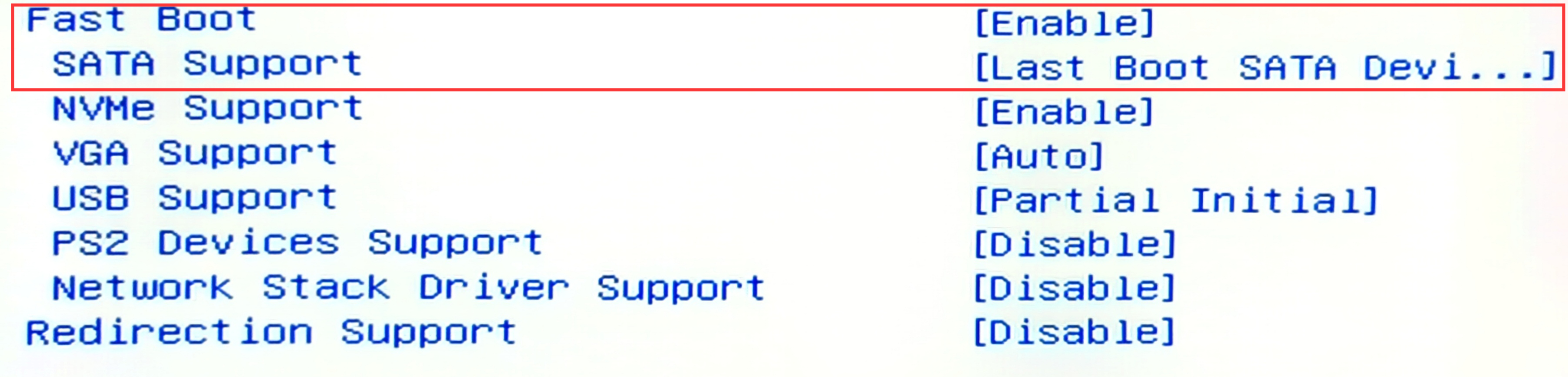
As shown in the figure, after enabling Fast Boot, these sub-options appear, indicating how these devices should be initialized during the fast boot process.
Among them, the initialization of SATA devices can be controlled. Since my system drive uses an NVMe interface, I simply set this option to “Only initialize the SATA device last used for Boot”.
I could not find a disabled option, but after setting it this way it made no difference from being disabled, and the restart worked normally again.